

Chronaut — Calendar Backup & Restore

Your calendar can now travel back in time.

Chronaut keeps a quiet record of every calendar on your iPhone, iPad, Mac or Android device: every deletion, every edit, with the time and the calendar it came from. When something disappears, Chronaut brings it back.

Install it today. Pay on the day you actually need it.

Email me when it ships
Coming soonApp Store Coming soon toGoogle Play
Chronaut on iPhone, Status screen: “Backup running”, last snapshot 16 seconds ago, 10 events backed up from 1 calendar, backed up since Oct 12, 2026 – on this device only, with a Back up now button and tips for denser backups below.

Good morning

Your calendars are backed up.

Backing up

Last snapshot 14 minutes ago

6 snapshots a day on average · last 7 days

3,412

events backed up

7

calendars

Back up now
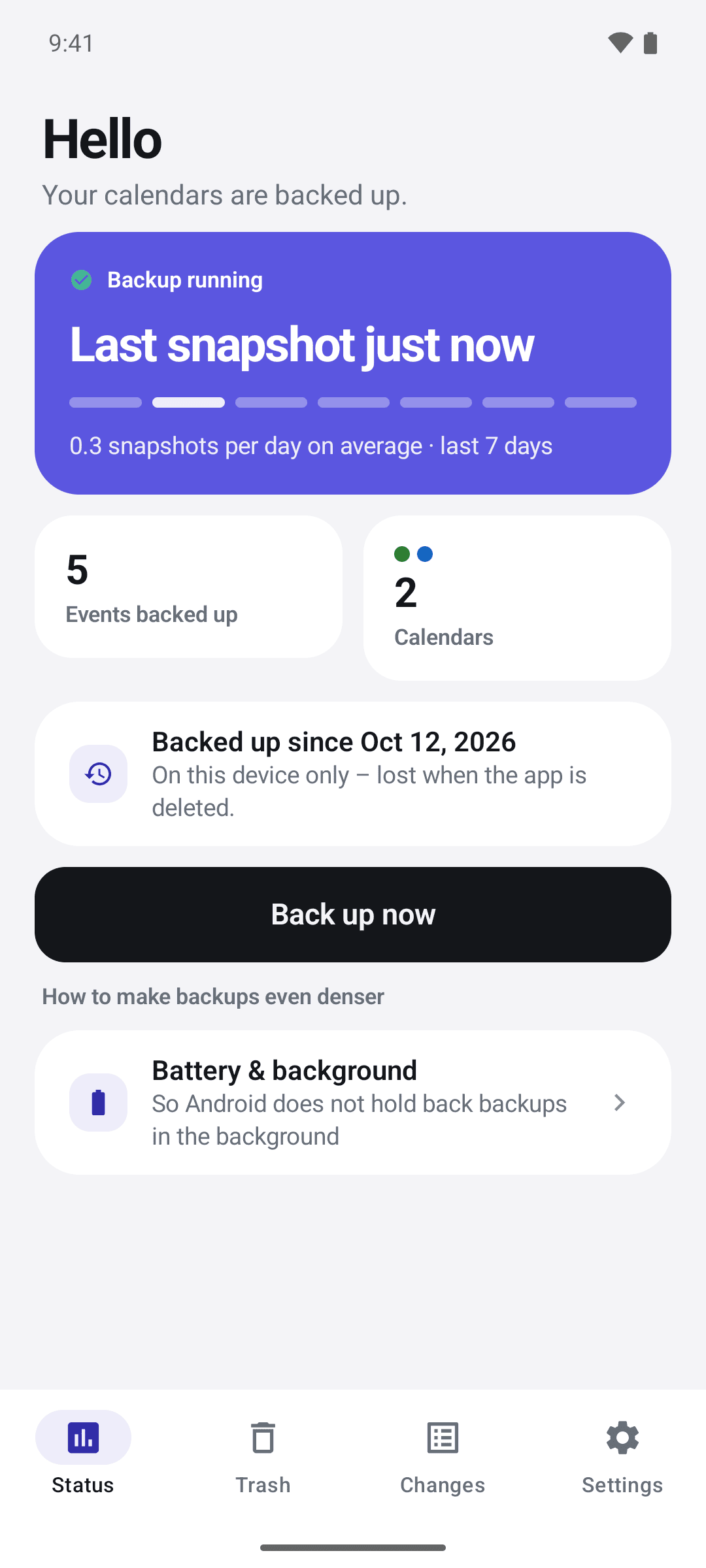
Chronaut on an Android phone, Status screen: “Backup running”, last snapshot just now, 5 events backed up across 2 calendars, backed up since Oct 12, 2026, with a Back up now button and a “Battery & background” tip below.

Gone. And back again.

Watch an event disappear — and watch Chronaut bring it back.

That is all there is to it. Chronaut never asks you to guess what was there — it shows the event, the calendar it came from, and the minute it went missing.

Three things Chronaut does for you.

One screen shows you what happened. One tap on Restore is all it takes. Everything else, Chronaut shows you only when you want to see it.

Chronaut watches while you don’t

On iPhone and iPad, snapshots run when you open Chronaut, when a calendar changes while it is open, on background refresh, and on a daily Shortcut you set up once. On the Mac, Chronaut sits in the menu bar all day and catches a change within seconds.

Chronaut backs up when you open it, as soon as a calendar changes, and schedules a background backup every 15 minutes – even after a restart. For a manual backup, tap “Back up now” or long-press the app icon.

Chronaut shows the whole change

Deleted, edited, created, moved to another calendar. Each entry carries the timestamp, the calendar it came from and the exact fields that changed. Every change stays traceable on its own.

Chronaut puts it back

Pick the event, confirm which calendar it lands in, restore. For a repeating series you choose “only this one” or “this and all following”.A deleted series comes back with its repeat rule; a single deleted occurrence comes back as an event of its own. Changed your mind? Undo is right there.

Quiet day to day, precise in the detail.

Two screens carry Chronaut: the log of what happened, and the moment it undoes the change.

Show for:

Switches the screenshots, features, prices and questions on this page.

This page describes both versions. Anything that applies to only one system is marked “Apple” or “Android”.

Chronaut on iPhone, Changes screen in week view: 2 deleted, 2 changed, 12 new – below them the individual events such as “Football” and “Cinema with Lisa” (changed) or “Parents’ evening” (deleted), each with its time and date.

Changes

Sat 12 Sep14 deleted
14 events deletedCalendar “Holiday 2026” removed · 19:4014
Fri 11 Sep1 deleted2 changed
Dentist — Lenadeleted 08:14 · originally Tue 16 Sep, 14:00
Team stand-upchanged 11:02 · time, location
Parents’ eveningchanged 17:38 · title
Thu 10 SepNothing lost
HistoryGrouped by day: deleted, changed and new — each with the time of the change and the event’s own date.
Chronaut on iPhone, event detail for “Football”: the old start 5:00 PM and end 6:30 PM struck through, the new times 6:30 PM and 8:00 PM beside them, earlier versions listed below and a Restore this version button.

‹ Changes

Dentist — Lena

Family · changed 11:02

Time

Tue 16 Sep, 14:00–14:45

Wed 17 Sep, 09:15–10:00

Location

Dr. Hoff, Bahnhofstr. 4

Dr. Hoff, Lindenallee 12

Unchanged

Title, notes, attendees, repeat

Restore this version

Do send the invitations again afterwards.

Event detailOld value struck through, new value below — and one button brings it back.
Chronaut on the Mac: the sidebar on the left with Status, Trash, Changes and Settings, and on the right the status card with the last snapshot 5 minutes ago, 10 events backed up from 1 calendar and a Back up now button.
Chronaut

This week

Backing up

Last snapshot 40 seconds ago

Running since 07:12 · 214 snapshots today

Fri 11 Sep1 deleted
Dentist — Lenadeleted 08:14 · originally Tue 16 Sep, 14:00
Team stand-upchanged 11:02 · time, location
MacChronaut sits in the menu bar, backs up all day, and the purchase carries over from your iPhone.
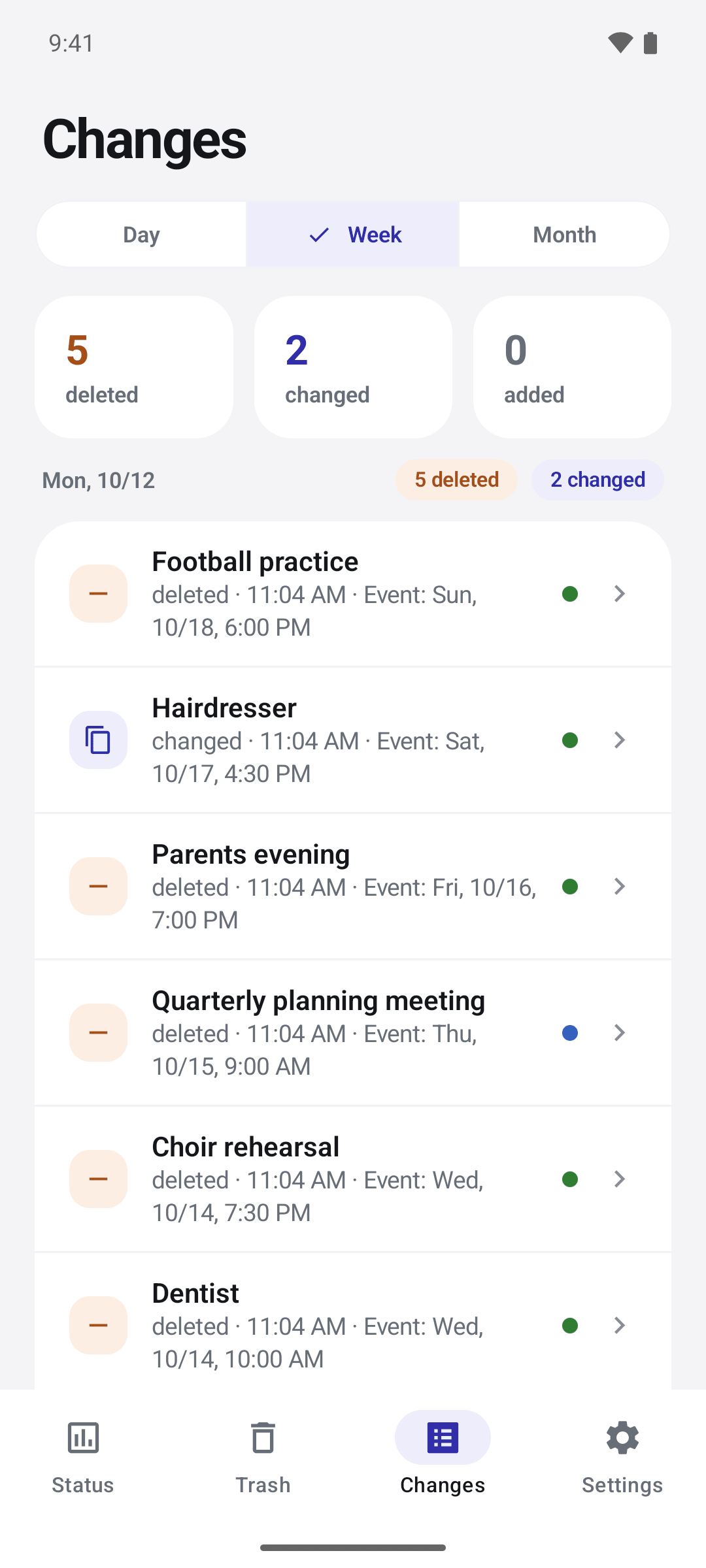
Chronaut on an Android phone, Changes screen with “Week” selected: tiles “5 deleted”, “2 changed”, “0 added”, and below entries such as “Football practice” deleted and “Hairdresser” changed, each with the time of the change and the event date.
Changes (Android)Day, week or month: deleted, changed and added — each with the time of the change and the date of the event.
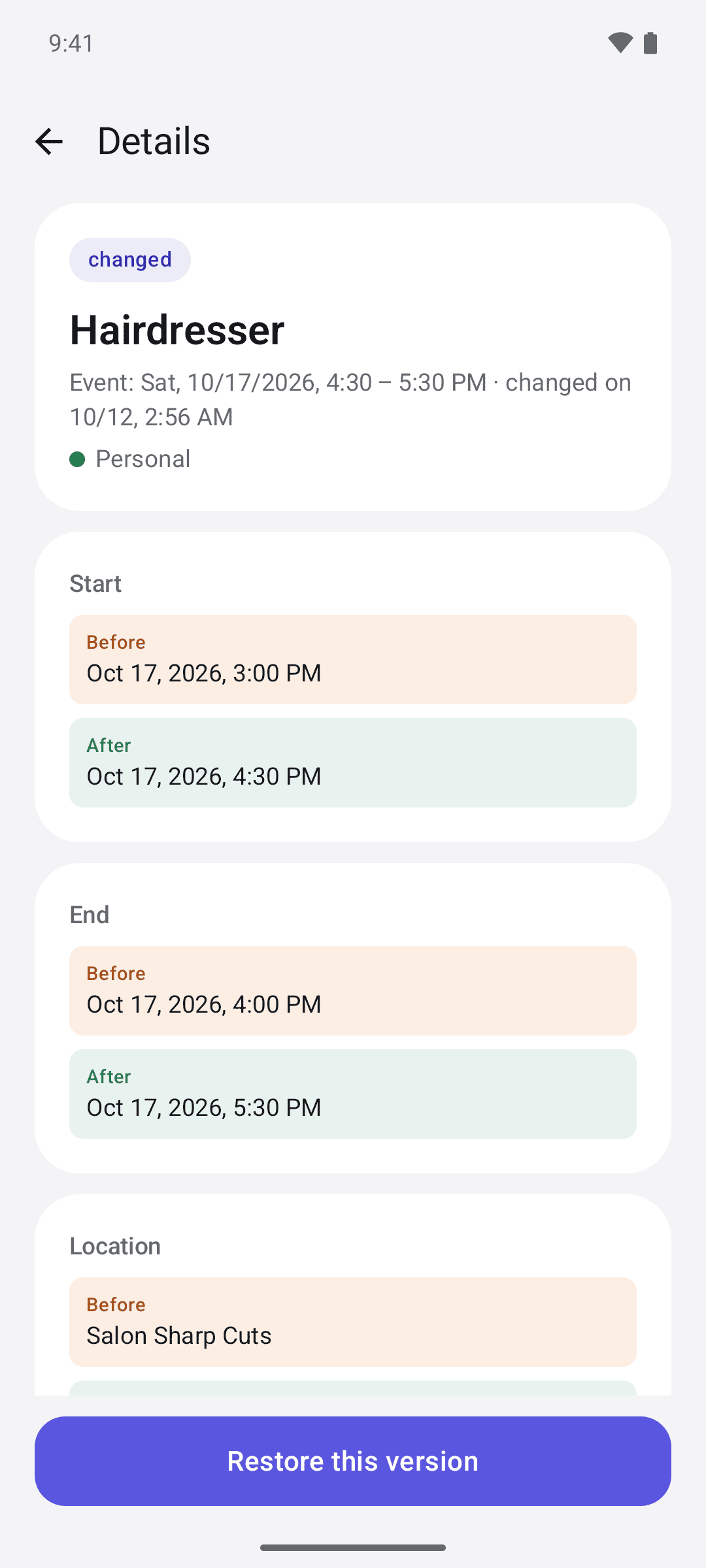
Chronaut on an Android phone, details for “Hairdresser” (changed): start, end and location each with “Before” and “After”, and a Restore this version button at the bottom.
Event detail (Android)Before and after, one above the other — and one button brings the old version back.

Built for the day something disappears.

A safety net under the calendar app you already use.

Every calendar on the device

Whatever your device shows, Chronaut backs up — iCloud, Google, Exchange, CalDAV and local calendars.Google, Exchange, local and every other calendar Android syncs. Subscribed, holiday and birthday calendars are read-only by nature, so Chronaut records them but never offers them as a restore target.

A real diff, not just a title

Title, time, location, notes, attendees, recurrence rule, alarms, calendar. Old value on one side, new value on the other.

Earlier versions, not only deletions

If an event was moved several times, Chronaut gives you back exactly the version you want — not just the last one.

Search the whole history

Find by title, location or notes across everything Chronaut has recorded, grouped by the day it went missing.

A whole calendar gone? One entry.

Remove an account and Chronaut writes a single line — “14 events deleted” — instead of fourteen lines, then restores them into a calendar of your choosing.

Honest about its own gaps

Chronaut does not promise to be gapless. Chronaut shows you the last snapshot, the daily average over the past week, and what would make coverage denser.

The Mac app costs nothing extra

Chronaut sits in the Mac menu bar and backs up continuously; Universal Purchase carries your iPhone or iPad purchase across.

Shortcuts and App Intents

“Back up calendars now” and “Show deleted events” run as Shortcuts on iPhone, iPad and Mac, so a daily automation keeps the history dense.

Backs up in the background

Chronaut backs up when you open it and as soon as a calendar changes, and schedules a background backup every 15 minutes. Android decides exactly when it runs — and it carries on by itself after a restart.

Help with “Battery & background”

If battery optimization holds the backup back, Chronaut shows it on the “Battery & background” screen and takes you to the right settings — with tips for Samsung, Xiaomi, Huawei and OnePlus devices.

Shortcuts on the app icon

Long-press the Chronaut icon: “Back up now” starts a backup right away, “Trash” opens the trash directly.

Free is not a demo. Free is the insurance.

The backup runs in full from the minute you install — free version included. What you pay for is seeing and restoring, on the day it matters.

Comparison of Free and Full version
Feature Free0 €Backup runs from day one Most people need thisFull version6,99 €One-time. No subscription.
Backs up all your calendarsincludedincluded
Weekly overview: how much was deleted or changedincludedincluded
Titles, original dates and detailsnot includedincluded
Full diff and earlier versionsnot includedincluded
Restore with one tapnot includedincluded
Search the whole historynot includedincluded
History kept for1 year1 year
Mac app, backing up continuouslyincludedincluded

Chronaut comes in a free and a full version. The full version is a one-time purchase at 6,99 € — on Apple and on Android alike. On Apple devices, one purchase covers iPhone, iPad and Mac and can be shared through Apple Family Sharing. Prices shown are the euro reference tier — the App Store shows yours. On Android, you buy the full version once through Google Play; the purchase covers all Android devices with your Google Account. Google Play shows the price you pay. A purchase in the App Store does not unlock Android, and vice versa.

Photos has a trash.Mail has a trash.Notes too.Calendar doesn’t.

Why Chronaut exists

“I like my calendar. It just can’t forgive.

For years it has bothered me that the calendar has no trash and no undo. One evening I fell asleep. My kid got hold of my Apple Watch and played with it — and two appointments were gone. No prompt, no notice, no way back.

The same thing happens in our shared calendar, only more quietly: somebody tidies up, an event is gone, and nobody can say what was in there before.

So I built what I was missing.

That is Chronaut.”

– Manuel

The job was clear from the start: back up automatically, show exactly what changed, and bring back every single event.

No second calendar app. No account. No subscription for the part you actually need.

Your calendar stays yours.

Chronaut has no server. There is no account to set up, and nothing anywhere holds the keys to your calendars.

  • No calendar content leaves your device.
  • No tracking, no analytics SDKs. Crash reports only through Apple or Google Play, and only if you opt in.
  • The backup sits on the device, behind iOS file protection.
  • Delete the whole history from Settings.
  • On Android, Chronaut has no internet permission. The history stays on the phone only and is excluded from Android backup.

What people ask first.

Doesn’t my calendar already have a trash?

No. Apple’s only recovery option is to roll all iCloud calendars back to an earlier point in time, which undoes everything else you did since. Google keeps a trash, but only for Google calendars and only in the browser. On Exchange it goes through an administrator. Chronaut works on the device, across every calendar it can see, and restores one event at a time.

Which calendars does Chronaut back up?

Every calendar your device has: iCloud, Google, Exchange, CalDAV and local ones. Google, Exchange, local ones and every other calendar Android syncs. Subscribed, holiday and birthday calendars are read-only by nature — Chronaut records them but cannot write into them, so it never offers them as a target.

What happens if I delete the app?

iOS removes the whole app container, and the history goes with it. Offloading the app keeps the data; deleting it does not. Chronaut says this during onboarding and keeps a permanent “backing up since …” line on the status screen, so it is never a surprise.

Uninstalling on Android deletes the whole history; it is deliberately excluded from Android backup. On a new phone, too, the history starts afresh. The status screen says so at all times: “On this device only – lost when the app is deleted.”

After reinstalling, “Restore purchase” brings your purchase back.

Can Chronaut really catch everything?

No, and Chronaut does not claim to. iOS or Android decides when an app may run in the background, so an event created and deleted between two snapshots cannot be recovered. Chronaut shows you how dense its coverage actually is and suggests what would improve it: a daily Shortcut, or the free Mac app, which runs all day and catches a change within seconds. on Android, above all the “Battery & background” screen in the app, if backups are late.

What is different between the Apple and the Android version?

The essentials are the same: Chronaut backs up the calendars on the device, shows every deletion and edit and restores events — no account, no server, and the history stays on the device. Only Apple has the free Mac app, Shortcuts for automations and Family Sharing. On Android, Chronaut has no internet permission, and the “Battery & background” screen helps when the system holds backups back. The full version costs 6,99 € on both, but is bought separately: in the App Store for Apple devices, on Google Play for Android.

Does my purchase work on iPad and Mac too?

Yes. One purchase covers iPhone, iPad and Mac with the same Apple ID and can be shared through Apple Family Sharing. On the other device, tap “Restore purchase” once.

Does my purchase carry over to a new Android phone?

Yes, to every Android device with your Google Account. Tap “Restore purchase” under Settings › Purchase there; Chronaut also checks your purchases with Google Play every time it starts. The history does not move with you — it stays on the old device.

When is it coming out?

For iPhone, iPad and Mac, TestFlight first, then the App Store; the Android app comes through Google Play. There is no date yet; the honest answer is “when the restore flow is boring and reliable”. Leave your address above and you will hear from us on exactly those two occasions.